Best Free Status Page Tools for Startups (2026)
Free status page options compared: features, limits, hosting location, and cookie usage. Includes EU-hosted picks for GDPR-first startups.
Your users deserve to know when something is down. A public status page builds trust, reduces support tickets, and shows your customers you take reliability seriously. The good news: you don’t need to pay for one.
Here are the 6 best free status page tools for startups in 2026 — from fully hosted to self-hosted, from simple to feature-rich.
Why Every Startup Needs a Status Page
Before the list, a quick reality check:
- 60% of users check a status page before contacting support during an outage
- A transparent status page reduces support ticket volume by 30-50% during incidents
- Showing uptime history builds trust with potential customers evaluating your product
- It takes less than 5 minutes to set one up
No excuses. Let’s find the right tool.
1. FoundersDeck — Best Free Status Page with Monitoring Included
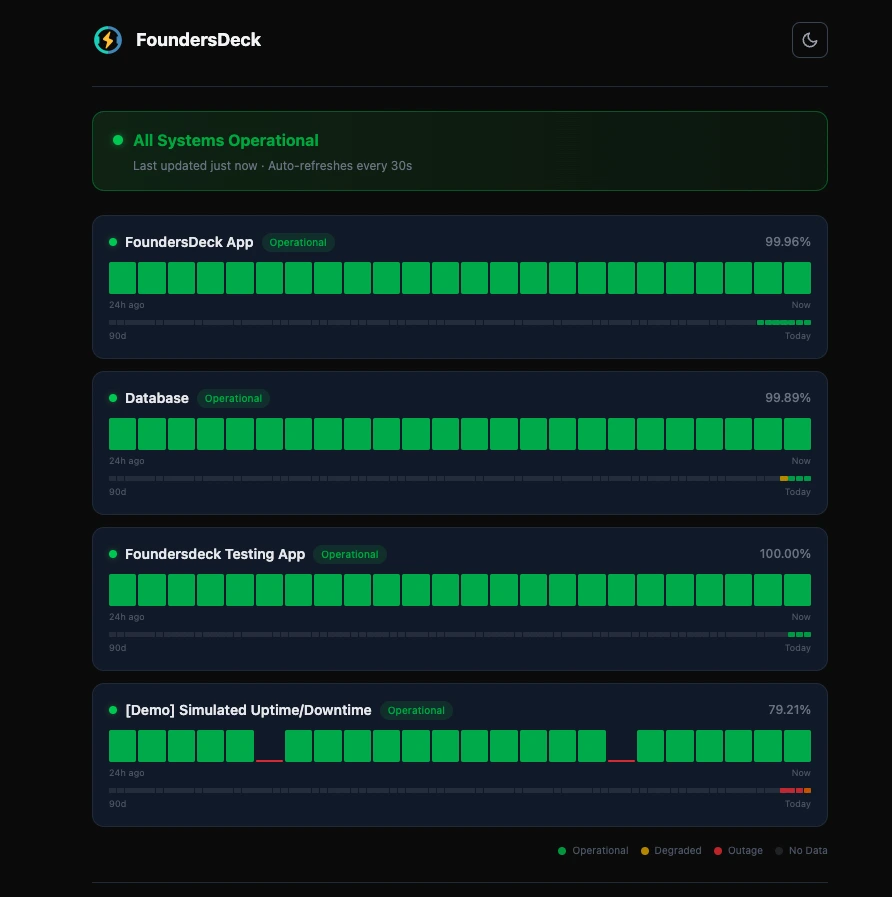
FoundersDeck’s free tier includes not just a status page, but also 5 monitors (uptime + heartbeat/cron) and email alerts. Your status page updates automatically based on real monitoring data — no manual incident posting required.
Free tier includes:
- 1 public status page
- 5 monitors (HTTP, Ping, Keyword, Heartbeat/Cron)
- Automatic incident detection and display
- Email alerts
- 30 days data retention
- Uptime bars and incident history
What makes it different:
- Status pages are completely cookie-free — no consent banner needed
- Incidents are detected and posted automatically
- Status pages show real uptime data, not manually updated labels
- All data stored in Germany (EU data residency)
Limitations: 1 status page, 5 monitors, no custom domain on free tier
Setup effort: 5 minutes (account → add monitors → create status page)
Best for: Startups that want monitoring and a status page in one tool, with EU data residency.
See it live: status.foundersdeck.dev — our own status page, built with FoundersDeck.
2. Instatus — Best Looking Free Status Page
Instatus is known for its beautiful, modern status page designs. Their free tier is generous for a status page-only tool.
Free tier includes:
- 1 status page
- Unlimited components
- Unlimited subscribers
- Email notifications
What makes it different:
- Arguably the best-looking status page designs available
- Easy-to-use component management
- Subscriber notifications built in
Limitations: No monitoring included — you need a separate tool for that. Manual incident posting required unless you integrate via API. US-based company.
Setup effort: 10 minutes (account → add components → customize design)
Best for: Startups that already have monitoring elsewhere and want the best-looking status page.
3. Cachet — Best Self-Hosted Option
Cachet is an open-source status page system you host yourself. It’s PHP-based and has been around since 2014. If you want full control over your status page infrastructure, Cachet is the go-to option.
Free tier: Completely free (self-hosted)
What makes it different:
- Full control over data and hosting
- Customizable design
- API for automated updates
- Subscriber management
Limitations: Requires server management. PHP/Laravel setup. No automatic monitoring — all incidents are manual or API-driven. Development has slowed significantly.
Setup effort: 30-60 minutes (server setup → deploy → configure)
Best for: Teams with DevOps capacity who want complete control over their status page.
4. Upptime — Best GitHub-Based Option
Upptime is a clever open-source project that uses GitHub Actions for monitoring and GitHub Pages for the status page. Your entire monitoring and status page lives in a GitHub repository.
Free tier: Completely free (uses GitHub infrastructure)
What makes it different:
- No server needed — runs entirely on GitHub
- Status page hosted on GitHub Pages
- Monitoring via GitHub Actions (cron)
- All history stored as Git commits
Limitations: 5-minute minimum check interval (GitHub Actions limit). Limited alerting. Requires GitHub knowledge. Public repos only on free tier.
Setup effort: 15-20 minutes (fork repo → configure YAML → enable Actions)
Best for: Developer-first startups comfortable with GitHub who want zero infrastructure costs.
5. BetterStack (Better Uptime) — Best Feature-Rich Free Tier
BetterStack offers a generous free tier that includes both monitoring and a status page. It’s a strong product with a modern UI.
Free tier includes:
- 10 monitors
- 1 status page
- Email and Slack alerts
- 3-minute check intervals
Limitations: US-based company — data processed in the US. Subject to the CLOUD Act. For EU teams with data residency requirements, this is a non-starter. See our BetterStack alternative article for details.
Setup effort: 5-10 minutes
Best for: Startups without EU data residency requirements who want the most features on a free plan.
6. Statuspage by Atlassian — Best for Enterprise Integration
Atlassian’s Statuspage is the industry standard for larger companies. While primarily a paid product, they offer a limited free tier.
Free tier includes:
- 1 status page
- 25 components
- Limited subscribers
Limitations: Very limited free tier. No monitoring included. Atlassian account required. US-based.
Setup effort: 10-15 minutes
Best for: Teams already using Jira/Confluence who want tight Atlassian integration.
Comparison Table
| Tool | Monitoring Included | Self-Hosted | EU Data | Cookie-Free | Setup Time |
|---|---|---|---|---|---|
| FoundersDeck | ✅ 5 monitors | ❌ | ✅ Germany | ✅ | 5 min |
| Instatus | ❌ | ❌ | ❌ US | ❌ | 10 min |
| Cachet | ❌ | ✅ | ✅ Your server | ✅ | 30-60 min |
| Upptime | ✅ GitHub Actions | ✅ GitHub | ❌ US (GitHub) | ✅ | 15-20 min |
| BetterStack | ✅ 10 monitors | ❌ | ❌ US | ❌ | 5-10 min |
| Statuspage | ❌ | ❌ | ❌ US | ❌ | 10-15 min |
Our Recommendation
If you want the fastest setup with monitoring included and EU data residency, start with FoundersDeck. Your status page will be live in under 5 minutes and it updates automatically from real monitoring data.
If design is your top priority and you don’t need monitoring included, Instatus has the best-looking pages.
If you want zero external dependencies and have DevOps capacity, Cachet or Upptime give you full control.
Want to learn more about GDPR-compliant monitoring tools? Or ready to set up your status page right now?
Frequently Asked Questions
What is the best free status page tool for startups?
It depends on what you need bundled with it. FoundersDeck (Germany) is the best pick if you want monitoring included and EU data residency — its free tier combines 1 status page with 5 uptime/heartbeat monitors, and the page updates automatically from real monitoring data. Instatus has the best-looking pages if you already have monitoring elsewhere. Upptime and Cachet are the strongest options if you want to self-host and keep full control. BetterStack offers the most features on a free plan but is US-based, which rules it out for teams with EU data residency requirements.
Can I get a status page completely free?
Yes. All six tools in this comparison offer a genuinely free option. Hosted free tiers (FoundersDeck, Instatus, BetterStack, Atlassian Statuspage) typically include 1 status page with limits on monitors, subscribers, or custom domains. Self-hosted options (Cachet, Upptime) are free without feature limits — Upptime even runs entirely on GitHub Actions and GitHub Pages, so there is no server to pay for. The trade-off is setup and maintenance effort: hosted tools take 5–15 minutes, self-hosting takes 30–60 minutes plus ongoing upkeep.
Do free status pages update automatically during an outage?
Only if monitoring is built in. FoundersDeck detects incidents through its own uptime and heartbeat checks and posts them to your status page automatically — no manual incident posting. Upptime monitors via GitHub Actions and commits status changes automatically. BetterStack also bundles monitoring on its free tier. Instatus, Cachet, and Atlassian Statuspage are status-page-only tools: incidents must be posted manually or pushed through their APIs from a separate monitoring tool, which is exactly the moment of an outage when you have the least time for manual updates.
Does a public status page need a cookie consent banner under GDPR?
Only if it sets cookies or loads third-party tracking — which several popular status page tools do by default. Every visitor to your status page is a data subject under GDPR, so a page that loads analytics or tracking cookies technically needs a consent banner. Cookie-free options avoid this entirely: FoundersDeck status pages set zero cookies and load no third-party requests by design, and self-hosted Cachet or GitHub-based Upptime pages can be run cookie-free as well. Instatus and BetterStack pages set cookies by default.
Which free status page tools are EU-hosted?
Of the hosted options, FoundersDeck is the only one with EU data residency on the free tier — all data is stored in Germany (Netcup, Nuremberg) and the operating company is German, so it is not subject to the US CLOUD Act. Instatus, BetterStack, and Atlassian Statuspage are US-based companies. Self-hosted Cachet runs wherever you deploy it, including your own EU server, and Upptime runs on GitHub’s US infrastructure. For the full jurisdiction analysis, see our GDPR-compliant monitoring tools comparison.

Engin Yildirim
Founder of FoundersDeck. 13+ years in software engineering. Building EU-first tools for founders.
Read more about me →